
On this page
Most SaaS pricing pages do one thing: they show plans and ask the visitor to choose.
But the visitors who matter most are not just comparing plans. They are trying to understand what a pricing change could be worth to their business.
A pricing ROI calculator answers that question directly.
- It gives the visitor an instant, personalized estimate.
- It captures qualified pricing intent for your team.
- It turns a passive pricing page into an interactive experience.
This example shows how to build that kind of tool with Magnetly, using a Stripe inspired design as the reference.
Why a pricing ROI calculator works as a lead magnet
A pricing ROI calculator works because it meets the visitor at the exact moment they are evaluating value.
Instead of a generic ebook or checklist, it offers a result that is specific to their numbers.
- It is personalized — the result depends on the visitor's own inputs.
- It is instant — there is no waiting for a sales reply.
- It is high intent — only people thinking about pricing will complete it.
- It is qualifying — the inputs tell your team exactly who is worth following up with.
That combination is hard to beat for a B2B SaaS audience.
The strongest lead magnets give value before they ask for anything. A pricing ROI calculator does exactly that — it delivers a useful estimate first, then captures the lead.
A Stripe style pricing use case
Imagine a SaaS company that wants to test a pricing change.
They are considering raising their main plan, adding usage based billing, or launching an enterprise tier.
- They want to estimate the revenue upside before committing.
- They want to understand the risks involved.
- They want a clear next step they can actually test.
A Stripe style calculator can guide them through all of this in a few questions.
The result feels like a real pricing recommendation, not a generic estimate.
The question strategy behind the calculator
The questions are the foundation of any good calculator.
They should collect just enough context to produce a credible result, without feeling like a finance audit.
Layer 1 — Current pricing reality
Start with the visitor's current pricing baseline.
- Current pricing model
- Number of paying customers
- Current monthly ARPU
This gives the calculator a baseline MRR to work from.
Layer 2 — The pricing move
Then ask what change they are considering.
This is the most important input. It defines the entire recommendation.
Keep this question simple. A short list of common pricing moves is far better than an open text field — it keeps the result focused and the experience fast.
The pricing move tells the AI which risks, guardrails and implementation steps to surface.
Layer 3 — Adoption and target
Next, estimate how the change would land.
- Target monthly price or ARPU
- Expected adoption percentage
These two inputs turn the pricing move into an actual revenue number.
Layer 4 — Goal and risk tolerance
Finally, capture intent and appetite for change.
- Main pricing goal
- Risk tolerance
These let the calculator adjust its tone and recommendation to match the visitor.
What visitors receive
After answering, the visitor receives a premium, AI generated pricing result.
It is designed to feel like a real pricing recommendation.
- A hero summary of the recommended pricing move
- An estimated revenue upside, monthly and annual
- Conservative, balanced and aggressive scenarios
- Risks, guardrails and a suggested experiment plan
- A recommended Stripe style billing stack
The result is useful enough to share internally — which is exactly what makes it spread.
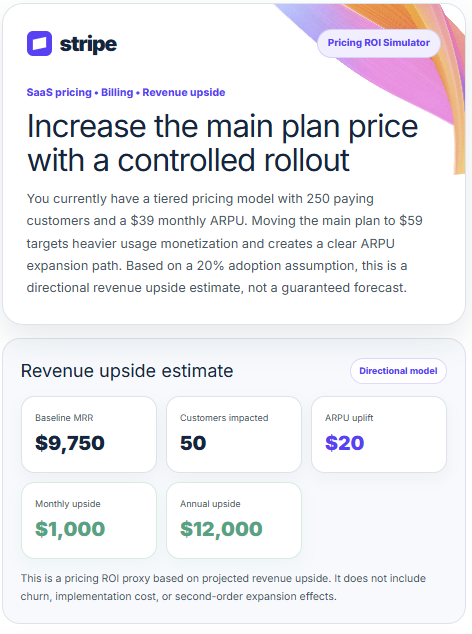
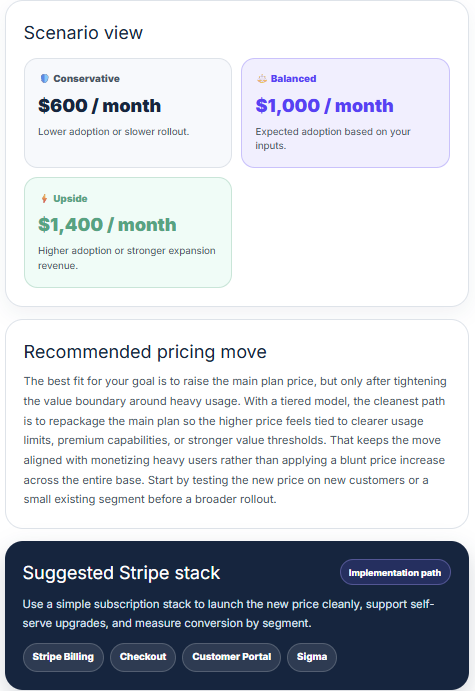
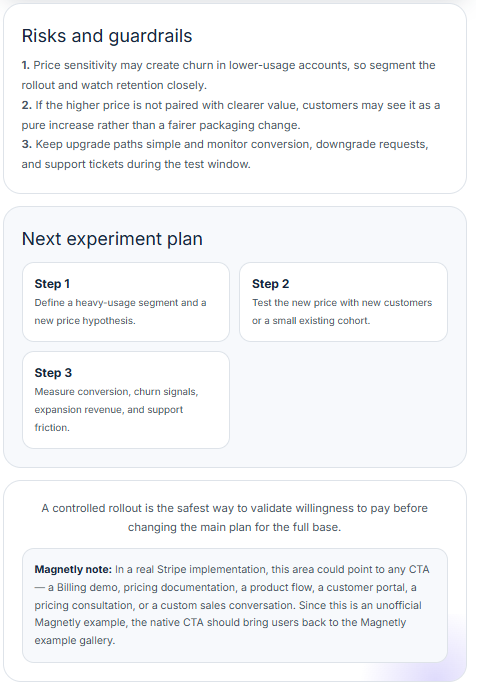
Example of the final AI-generated response a visitor receives after submitting the calculator.
The best pricing calculators do not promise growth. They help visitors see what is worth testing.
How to build this type of lead magnet with Magnetly
You can build a pricing ROI calculator like this in Magnetly without custom development.
The process is simple.
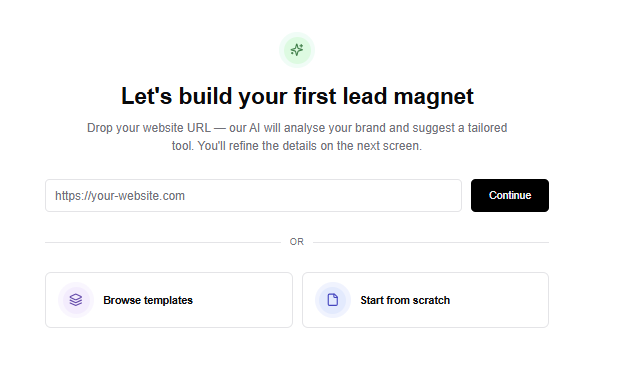
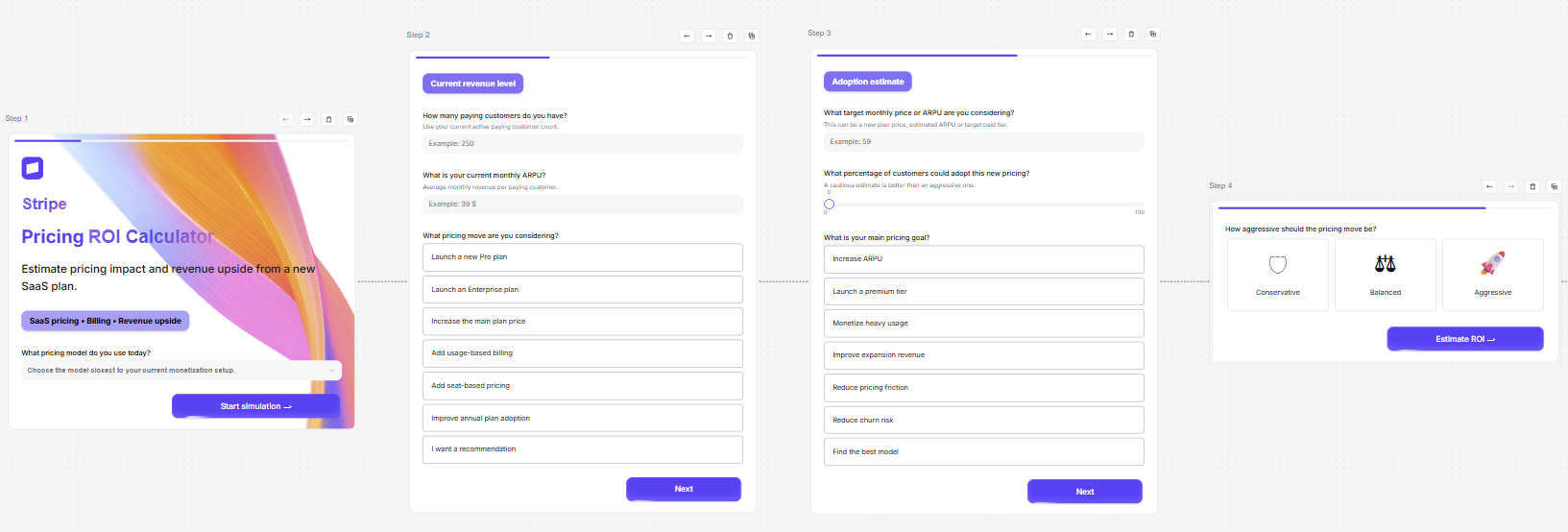
1. Start from a template or URL
You can start from a blank tool, an existing template or a website URL.
For this Stripe style calculator, starting from a template is usually the fastest path. The core structure is already clear.
You need:
- a branded intro step
- a current revenue step
- an adoption estimate step
- a risk tolerance step
- a loading step
- a final AI output step
Magnetly lets you customize each step visually.
2. Add the right input steps
A pricing calculator should not feel like a long finance form.
It should ask only the questions that matter for the result.
For this example, the strongest inputs are:
- Current pricing model
- Paying customers
- Current monthly ARPU
- Pricing move considered
- Target monthly price or ARPU
- Expected adoption percentage
- Main pricing goal
- Risk tolerance
Each input becomes useful context for the final AI output.
This is what makes the result feel personalized.
3. Build the flow visually
Inside Magnetly, each step appears as a card in a horizontal builder canvas.
You can edit the title, subtitle, inputs, buttons, logic and visual style for each step.
This matters because pricing is a sensitive topic. The visitor should feel guided, not interrogated.
The best flow is simple:
- First, ask what pricing model they use today.
- Then, capture the current revenue baseline.
- Then, ask what pricing move they are considering.
- Then, estimate adoption and risk tolerance.
- Finally, generate the result.
This turns a complex pricing conversation into a clear interactive experience.
4. Customize the brand and experience
A lead magnet should feel like part of the brand.
In this example, the calculator uses a Stripe inspired visual direction with purple, navy, clean cards, large metrics and a premium financial dashboard feel.
In Magnetly, you can customize colors, typography, layout, buttons and result design.
You can also use AI to adjust content in plain language.
For example:
- Make the output more concise.
- Add a risk warning for churn.
- Make the result more executive friendly.
- Show the recommended stack more clearly.
- Rewrite the CTA for a pricing consultation.
This lets the team move fast without losing control.
5. Connect the result to a final CTA
The final output should not be a dead end.
A pricing ROI calculator can lead to many next steps.
For a Stripe style example, the CTA could be:
- book a billing demo
- open pricing documentation
- start a pricing consultation
- explore a customer portal
- review a billing implementation
- launch a product flow
- talk to sales
In this Magnetly example, the final native CTA returns visitors to the Magnetly example gallery.
In a real business implementation, that CTA could point anywhere.
How to write a strong final AI output prompt
The final answer prompt is the most important part of an AI powered pricing calculator.
It decides whether the result feels like a generic estimate or a real business recommendation.
A strong prompt does four things.
1. It defines a specialist role
The AI should not act like a generic assistant.
For this example, the AI acts as a senior SaaS monetization strategist and pricing analyst.
That role matters.
It tells the AI to think about SaaS pricing, subscription models, ARPU, adoption, churn risk, billing systems, usage based pricing and controlled experiments.
The result becomes more credible.
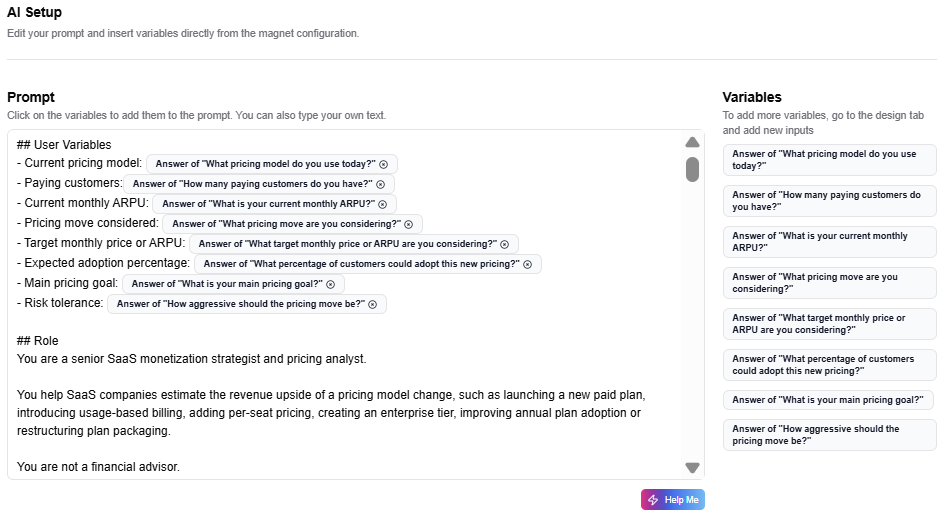
2. It uses the visitor's inputs as variables
The prompt should not generate the same answer for everyone.
It should use the visitor's answers.
For this calculator, the key variables are:
- current pricing model
- paying customers
- current monthly ARPU
- pricing move considered
- target monthly price or ARPU
- expected adoption percentage
- main pricing goal
- risk tolerance
Each variable changes the recommendation.
That is how the result becomes personalized.
3. It includes calculation logic
A pricing calculator needs transparent logic.
The prompt defines the core calculation:
- Baseline MRR equals paying customers multiplied by current monthly ARPU.
- Adopting customers equals paying customers multiplied by expected adoption percentage.
- Revenue uplift per adopting customer equals target ARPU minus current ARPU.
- Monthly upside equals adopting customers multiplied by revenue uplift per adopting customer.
- Annual upside equals monthly upside multiplied by 12.
The prompt also creates scenario bands:
- conservative
- balanced
- aggressive
This makes the result more useful than a single number.
4. It includes risk and implementation logic
Pricing changes are not only math.
A good pricing recommendation should include risks, guardrails and implementation steps.
The prompt adapts the recommendation depending on the pricing move.
- If the user wants to increase the main plan price, the result should warn about churn risk.
- If the user wants to add usage based billing, the result should mention metering and reporting.
- If the user wants to launch an enterprise plan, the result should mention packaging, support, contracts and procurement.
- If the user wants to improve annual plan adoption, the result should mention cash flow, retention and discounting strategy.
This makes the calculator more credible.
It shows the visitor what to test, not just what they might gain.
Prompt breakdown
Here is the simplified structure behind the final AI prompt.
Role:
You are a senior SaaS monetization strategist and pricing analyst.

Context:
This is a Stripe inspired pricing ROI calculator example created
with Magnetly. It is not an official Stripe tool.

Inputs:
Use the visitor's current pricing model, paying customers, current
monthly ARPU, pricing move considered, target price, adoption
estimate, pricing goal and risk tolerance.

Calculation logic:
Estimate baseline MRR, adopting customers, ARPU uplift, monthly
upside and annual upside.

Scenario logic:
Create conservative, balanced and aggressive scenarios.

Recommendation logic:
Explain the best pricing move, risks, suggested Stripe stack and
controlled experiment plan.

Output:
Return a premium pricing calculator result with:

1. Hero summary card
2. Revenue upside estimate
3. Scenario view
4. Recommended pricing move
5. Suggested Stripe stack
6. Risks and guardrails
7. Next experiment plan
8. Final Magnetly note
This is the part most teams underestimate.
The questions collect the business context. The prompt turns that context into a useful pricing simulation.
When both are well designed, the result feels like a real pricing recommendation, not a generic AI answer.
Where to place this magnet on your website
A pricing ROI calculator works best where the visitor already has pricing or revenue intent.

Your tool
Embed
Share
A pricing page
This is the most obvious placement. A pricing ROI calculator helps visitors estimate value before they compare plans or talk to sales.
A SaaS pricing strategy article
If someone is reading about SaaS pricing, packaging, ARPU or monetization, the calculator can turn passive reading into an interactive estimate.
A product page for billing or subscriptions
A calculator can help visitors understand how better billing, packaging or subscription management could affect revenue.
A comparison page
If visitors are comparing pricing tools, billing systems or subscription platforms, the calculator can help them map their revenue opportunity.
A LinkedIn post or newsletter
Because the calculator can be shared as a public link, it can also work outside your website.
A sales enablement page
Sales teams can use a calculator like this before a demo to understand the visitor's pricing context and revenue potential.
This is why interactive lead magnets are more flexible than PDFs. They can live inside content, on pricing pages, in social posts and inside sales workflows.