
On this page
Why this profit margin calculator works as a lead magnet
Most ecommerce lead magnets ask visitors to download something static.
A profit calculator does something more useful.
It helps the visitor understand how their current store economics work, where gross profit may be leaking, and which optimization lever deserves attention first.
That is why the Shopify Profit Margin Calculator is a strong example of an interactive lead magnet.
Instead of asking a merchant to read a generic profitability guide, it asks for a few useful inputs such as store type, monthly orders, average order value, gross margin, traffic, conversion rate, and the biggest profit pressure they are dealing with.
Then it returns a practical directional forecast.
The visitor gets more than information. They get a clearer next step.
The merchant receives useful insight. The business captures qualified commercial context.
That is the core idea behind Magnetly.
Static ecommerce content teaches. Interactive calculators diagnose.
Why a Shopify style example makes sense
Shopify is strongly associated with ecommerce operators, store dashboards, order volume, conversion, checkout performance, merchandising, and profit optimization.
That makes it a natural reference point for this type of lead magnet.
A Shopify-inspired calculator does not need to inspect a real store to create value. It can ask the right questions and generate a directional profitability recommendation based on the visitor's own inputs.
For example, the calculator can help surface issues such as:
- low gross margin
- low average order value
- low conversion rate
- too much discounting
- shipping cost pressure
- high refund or return rate
- high paid acquisition pressure
- store economics that do not fully match traffic expectations
Each of these signals points to a different optimization path.
A merchant trying to improve margin does not need the same recommendation as a merchant trying to improve AOV. A dropshipping store does not need the same first move as a DTC brand with a strong repeat purchase base.
That is why this example makes sense.
It translates a broad profitability problem into a specific store optimization direction.
The question strategy behind the calculator
A strong lead magnet does not ask random questions.
Every question should either improve the result for the visitor or help the business qualify the lead.
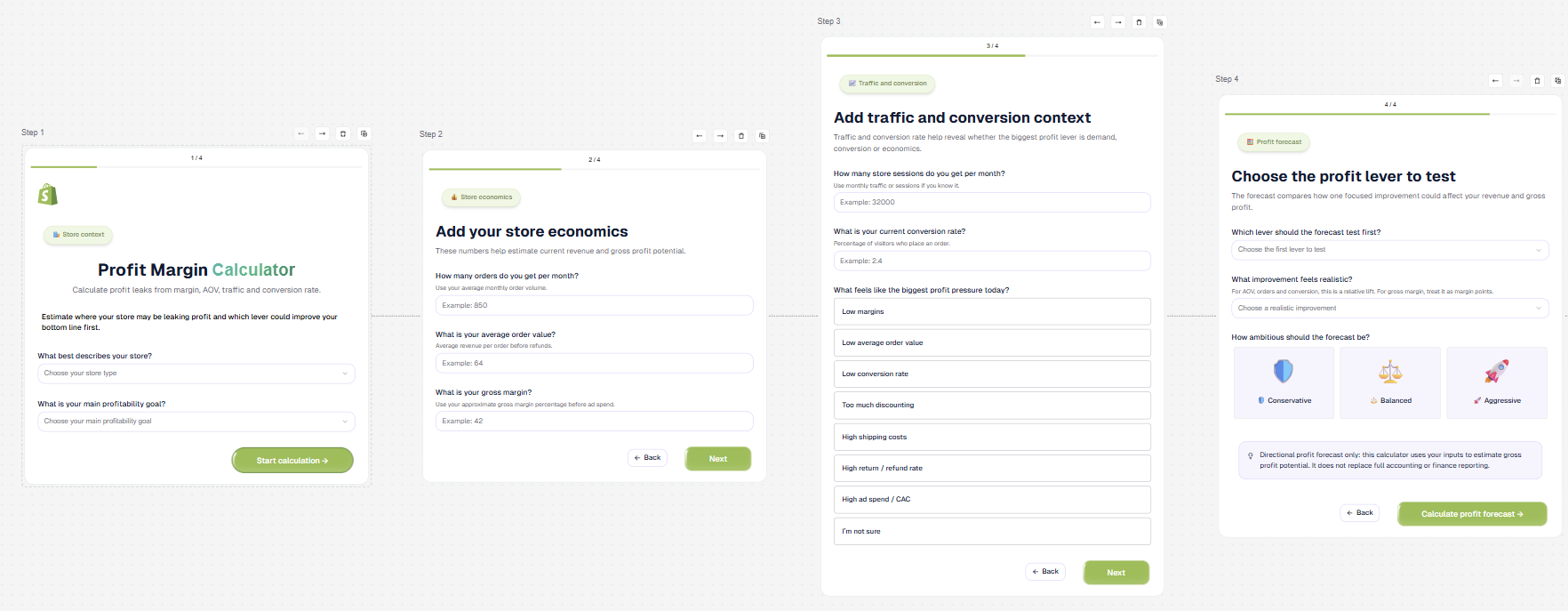
For this Shopify Profit Margin Calculator, the questions are designed around five layers.
1. Understand the store context
The first step identifies the store type and the main profitability goal.
A fashion brand, dropshipping store, beauty brand, high-ticket store, or general ecommerce store may not have the same economics or the same best first lever.
This is why context matters before any number is entered.
2. Understand the current economics
The second step captures monthly orders, average order value, and gross margin.
These numbers create the baseline.
Without them, a forecast becomes generic. With them, the AI can estimate current revenue, gross profit, and profit per order.
3. Understand traffic and conversion
The third step captures monthly sessions, current conversion rate, and the biggest profit pressure.
This layer helps reveal whether the store mostly has a traffic problem, a conversion problem, an offer problem, or a margin structure problem.
4. Choose the forecast lens
The fourth step asks which profit lever to test first, what improvement feels realistic, and how ambitious the forecast should be.
This is important because merchants do not always need the biggest theoretical upside.
They need the most realistic next test.
5. Make the result actionable
This structure makes the output feel practical rather than generic.
The calculator does not just label the store. It gives the visitor a direction.
What the visitor receives
The value of the quiz is not the questions.
The value is the personalized profit forecast.
A weak calculator gives a generic number. A strong calculator gives context, diagnosis, scenarios, and a next step.
This Shopify Profit Margin Calculator is designed to generate a result that feels like a premium ecommerce performance dashboard.
The final answer includes:
- Ecommerce profit forecast
- Store economics overview
- Profit leak diagnosis
- Scenario forecast
- Recommended profit lever
- Shopify style optimization plan
- Risks and guardrails
- 7 day profit improvement plan
- Final Magnetly note
The forecast summary explains the current situation and the most likely profit lever to test first.
The economics overview surfaces revenue, gross profit, and profit per order.
The diagnosis section identifies the main leak.
The scenario view helps the visitor compare conservative, balanced, and aggressive cases.
The recommended lever section gives the strategic recommendation.
The optimization plan translates the recommendation into practical actions.
The risks and guardrails keep the forecast honest.
The 7 day plan turns strategy into execution.
This is a directional profitability tool, not a full accounting model. It is designed to help merchants prioritize, not replace financial reporting.
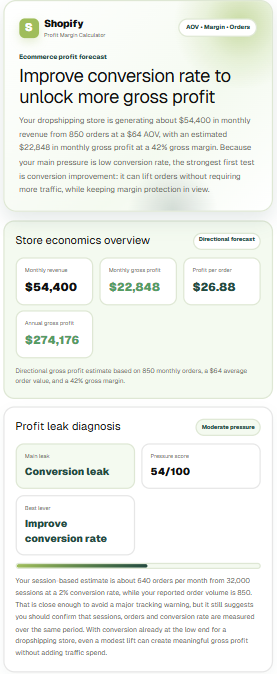
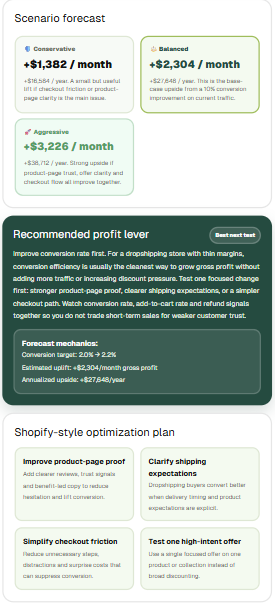
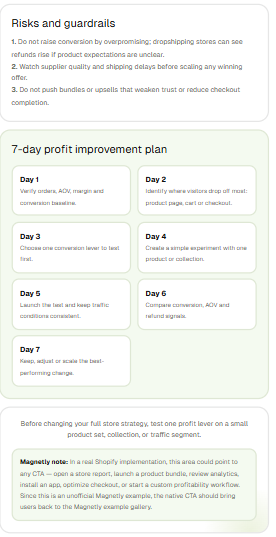
Example of the final AI-generated response a visitor receives after submitting the calculator.
The best lead magnets do not ask for trust first. They earn it by giving the visitor something useful.
How to build this type of lead magnet with Magnetly
You can build a calculator like this in Magnetly without custom development.
The process is simple.
1. Start from a template or URL
You can start from a blank tool, an existing template, or a website URL.
For a calculator like this, starting from a template is often the fastest path. The core structure is already clear.
You need:
- a welcome step
- a few structured input steps
- a lead capture moment if desired
- a loading step
- a final AI output step
Magnetly lets you customize each step visually.

2. Add the right input steps
For this calculator, the strongest inputs are:
- store type
- profitability goal
- monthly orders
- average order value
- gross margin
- monthly sessions
- current conversion rate
- biggest profit pressure
- forecast lever
- realistic improvement
- forecast ambition
Each answer becomes useful context for the AI output.
3. Build the flow visually
Inside Magnetly, each step appears as a card in a horizontal builder canvas.
You can edit the title, subtitle, input fields, options, logic, and visual style for each step.
Magnetly also includes:
- automatic branding scraping
- a chat bar for natural language edits
- a Canva style visual editing feel
- easy no-code component editing
4. Brand the experience
This example uses a Shopify-inspired visual language with soft green accents and clean store-economics styling.
Magnetly makes it easy to create a branded experience without rebuilding the tool from scratch.
5. Set up the final AI result
The final result is the most important part.
It should not just repeat numbers.
It should interpret the inputs, explain the likely profit lever, show realistic scenarios, warn about guardrails, and suggest a short action plan.
Prompt strategy
The quality of the result depends heavily on the final AI prompt.
A calculator like this works best when the final prompt does four things well.
1. It defines a clear role
The AI should behave like an ecommerce profitability strategist, not a generic assistant.
That role tells the AI to think about store economics, merchandising, conversion, margin and discounting — not generic marketing tips.
2. It interprets the right variables
The prompt needs access to store type, margin, traffic, conversion, and the selected forecast lever.
Each variable changes the recommendation. That is how the result becomes personalized.
3. It applies cautious calculation logic
The result should estimate revenue and gross profit directionally, but it should not pretend to be a complete financial statement.
The prompt explicitly avoids overpromising and labels assumptions when inputs are missing.
4. It forces a useful output structure
The final answer should be broken into clean sections such as overview, diagnosis, scenarios, recommendation, guardrails, and action plan.
This is what turns a simple calculator into a true consultative lead magnet.
Prompt breakdown
Here is the simplified structure behind the final AI prompt.
Role:
You are a senior ecommerce profitability strategist and
margin optimization consultant.

User variables:
Store type, profitability goal, monthly orders, AOV, gross
margin, monthly sessions, conversion rate, biggest profit
pressure, forecast lever, realistic improvement, ambition.

Shopify context:
Use ecommerce dashboard concepts — AOV, margin, conversion,
discounting, shipping, refunds, CAC, profit per order.

Magnetly example context:
This is a Magnetly concept example. Not an official Shopify
tool. End with a Magnetly note.

Calculation rules:
Compute monthly revenue, monthly gross profit, profit per
order, annual gross profit, and a tracking consistency check.

Forecast lever logic:
Apply the selected lever (AOV, margin, conversion, orders,
discounting) with the realistic improvement to compute uplift.

Output structure:
1. Hero summary card
2. Store economics overview
3. Profit leak diagnosis
4. Scenario forecast
5. Recommended profit lever
6. Shopify-style optimization plan
7. Risks and guardrails
8. 7-day profit improvement plan
9. Final Magnetly note

Visual direction:
Shopify-inspired colors, light green accents, white cards,
merchant dashboard feel.

Final constraints:
No tables, no markdown, no fake analytics, no official claim.
This is the part most teams underestimate.
The questions collect the business context. The prompt turns that context into a useful profit simulation.
Where to place this magnet on your website
A lead magnet like this works best where the visitor is already thinking about store performance, revenue, margin, or conversion.

Your Magnetly tool
Embed
Share
A Shopify consultant or ecommerce agency landing page
If someone is evaluating ecommerce growth support, a profit margin calculator can turn a passive visit into an interactive diagnostic.
A blog article about AOV, conversion rate, or profit optimization
A visitor reading educational content is already thinking about store performance. A calculator turns reading into action.
A product or service page for CRO, ecommerce strategy, or store audits
The calculator helps pre-qualify leads and demonstrates expertise before a call.
A newsletter or LinkedIn post
Because the calculator can be shared as a public link, it works well in outbound or content distribution.
A resource hub or tools page
This gives the tool a permanent discoverable home.
An embedded page on a store growth or audit offer page
The calculator can help a consultant or agency capture more qualified merchant leads.