
On this page
Most website owners know something is wrong when visitors do not convert.
The problem is that they often do not know where the friction is happening.
Is the headline unclear?
Is the CTA too hidden?
Is the form asking too much?
Are paid visitors landing on a page that does not match the promise of the ad?
Are mobile users missing the next step?
Are high-intent visitors hesitating because proof or trust signals are too weak?
That is why a Conversion Analyzer works well as an interactive lead magnet.
Instead of giving every visitor the same CRO checklist, it asks a few focused questions about their page, goal, audience, drop-off point and behavior signals.
Then it turns that context into a directional pre-audit.
The visitor gets a clearer hypothesis. The business captures high-intent conversion context.
That is exactly what a strong AI lead magnet should do.
Why this conversion analyzer works as a lead magnet
A lot of CRO content is useful, but generic.
A blog post can explain heatmaps. A guide can explain session replays. A checklist can explain form optimization.
But none of those formats understand where the visitor is stuck right now.
A conversion analyzer does.
It asks the visitor to describe the page or funnel they want to improve, the conversion goal, the audience, the suspected drop-off point, the most worrying behavior signal, the main traffic source and the device context.
That combination is powerful.
A visitor might say "our page does not convert", but inside their answers they may reveal a much more precise issue.
- Maybe the main CTA is too low on mobile.
- Maybe visitors click the CTA but abandon the form.
- Maybe paid traffic lands on a page that does not match the ad promise.
- Maybe the product page lacks proof before the decision point.
- Maybe the booking flow creates sales-call anxiety.
- Maybe the checkout hides too much cost until the final step.
This is why the magnet works. It turns a vague conversion problem into an inspection plan.
Static CRO content explains best practices. Interactive analyzers reveal what to inspect first.
Why a Hotjar style example makes sense
Hotjar is strongly associated with behavioral analytics, heatmaps, session replays, funnels, surveys, feedback widgets and UX friction discovery.
That makes it a natural reference point for a conversion analyzer.
A Hotjar-style analyzer does not need to inspect real heatmaps or live recordings to create value. It can start with the visitor's own signals.
- What page are they worried about?
- What action do they want visitors to take?
- Where do visitors seem to drop off?
- What behavior signal feels most worrying?
- Which traffic source brings the visitors?
- Where does the issue feel strongest?
That is enough to create a useful directional pre-audit.
The output should not pretend to be a full analytics report. Instead, it should help the visitor decide what to inspect first.
That is the key.
A CRO team does not always need a huge report to take action. Often, they need a sharper hypothesis, a clear inspection plan and a few experiments to validate.
This example shows how Magnetly can package that kind of CRO thinking into an interactive lead magnet.
Why this is more than an AI-coded tool
This Hotjar example shows the real power of Magnetly. The tool is not just built with AI. It uses AI live to deliver a personalized CRO pre-audit to every visitor.
AI app builders are powerful because they help you create software faster. You describe the interface, logic and workflow, then the AI helps generate the app.
That is useful, but it is not the same thing as what Magnetly does.
A classic AI-built tool usually has fixed logic. The visitor fills a form, the tool runs predefined rules, then it returns a result.
Magnetly goes further.
Category A
AI app builders
Great for creating software faster.
 Lovable
 Claude
You describe what to build. AI helps generate the app, interface and rules.
Category B
Magnetly
Built for live AI-powered lead magnets.
 Magnetly
Visitors interact with a branded tool. Their answers are sent to AI with your CRO expertise, so every audit feels tailored.
AI app builders help you build software. Magnetly helps you turn expertise into an AI experience your visitors can use.
With Magnetly, the visitor's answers become live context for an AI system. The tool captures the inputs, combines them with your business knowledge, your final output prompt, optional documents, website context and sometimes external research, then generates a personalized response.
That makes the experience feel less like a static audit checklist and more like a focused mini AI consultant.
This Hotjar-style analyzer is a perfect example.
The visitor describes a conversion problem and the AI turns that context into a friction hypothesis, funnel risk map, inspection plan, quick experiments and 7-day CRO plan.
For a CRO consultant, UX agency, SaaS team or ecommerce growth team, this is extremely valuable. Instead of building a rigid audit tool with dozens of branches, the business can package its conversion methodology inside the prompt. The lead magnet becomes a lightweight CRO strategist that works for every visitor, while still capturing rich lead context.
A coded tool follows logic. A Magnetly tool applies expertise.
The question strategy behind the analyzer
A strong conversion analyzer does not need to ask every possible CRO question.
It needs to ask the few questions that shape the diagnosis. This Hotjar-style analyzer is built around five layers.
1. Understand the page or funnel
The first layer asks which page or funnel the visitor wants to analyze.
This matters because every funnel type has a different risk pattern.
- A homepage needs clarity, segmentation and CTA discovery.
- A landing page needs message match, proof and CTA intent.
- A product page needs product understanding, trust and add-to-cart confidence.
- A pricing page needs plan clarity, objection handling and decision support.
- A checkout needs payment trust, total cost clarity and form simplicity.
- A booking flow needs expectation clarity and lower sales-call anxiety.
- A lead capture form needs value exchange and privacy reassurance.
This question prevents the audit from becoming generic.
2. Understand the conversion goal
The analyzer then asks what the visitor wants people to do.
A purchase goal is not the same as a demo booking goal. A free trial is not the same as a form submission. A content download is not the same as an add-to-cart event.
The conversion goal shapes the friction hypothesis.
For example, if the goal is booking a demo, the analyzer should think about proof, trust, sales-call anxiety and what happens after the CTA click. If the goal is checkout, the analyzer should think about price clarity, payment trust, unexpected costs and final decision anxiety.
3. Understand the suspected drop-off point
The next layer asks where visitors seem to drop off. This is the most important CRO clue.
- Before the main CTA suggests value clarity, CTA visibility or first-screen hierarchy problems.
- After clicking the CTA suggests expectation mismatch.
- On the form suggests field friction or weak value exchange.
- At checkout suggests trust or cost friction.
- On mobile suggests layout, tap target, speed or visibility issues.
The drop-off point tells the AI where to focus first.
4. Understand the behavior signal
The analyzer also asks which signal worries the visitor most.
Low conversion rate, high bounce rate, low scroll depth, weak CTA clicks, rage clicks, form abandonment and checkout abandonment all point to different inspection workflows.
- Weak CTA clicks point toward click maps and CTA visibility analysis.
- Rage clicks point toward session replays and interaction confusion.
- Form abandonment points toward form interaction review.
- Low scroll depth points toward heatmaps and above-the-fold clarity.
This makes the result feel Hotjar-native.
5. Understand traffic and device context
Finally, the analyzer asks about traffic source and device context.
- Paid traffic usually makes message match more important.
- Organic traffic often makes search intent and content relevance more important.
- Mobile issues often point toward tap targets, sticky CTA, layout and scroll depth.
- Desktop issues often point toward comparison, proof, information architecture and decision support.
This helps the final output become more specific.
What the visitor receives
The value of the analyzer is not the questions. The value is the directional CRO pre-audit.
A weak analyzer gives generic advice. A strong analyzer gives a prioritized inspection plan.
This Hotjar Conversion Analyzer is designed to output:
- Hero summary card
- Conversion friction score
- Funnel risk map
- Primary blocker hypothesis
- What to inspect first
- Quick experiments
- Risks and guardrails
- 7-day CRO action plan
- Final Magnetly note
The hero summary gives the visitor a clear read on the likely conversion issue.
The friction score gives a directional risk level without pretending to be exact analytics.
The funnel risk map breaks the page into the most likely friction stages.
The blocker hypothesis turns the inputs into a concrete CRO theory.
The inspection section tells the visitor which Hotjar-style workflows to check first.
The quick experiments give testable changes. The guardrails prevent premature redesigns. The 7-day plan turns the audit into action.
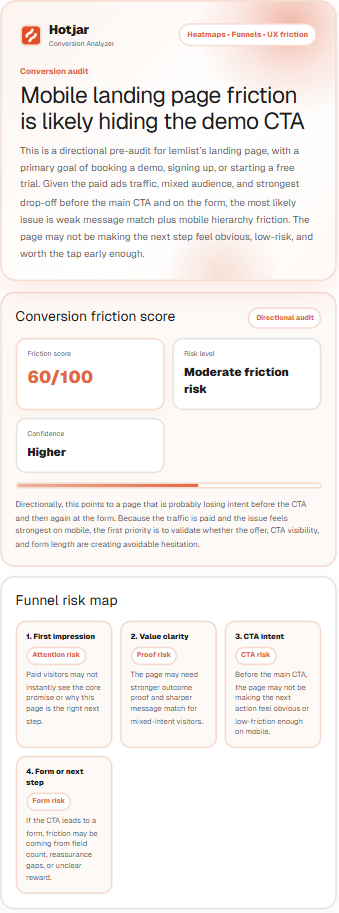
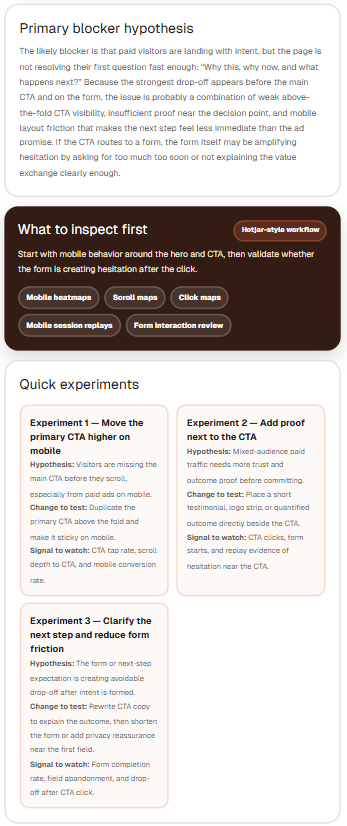
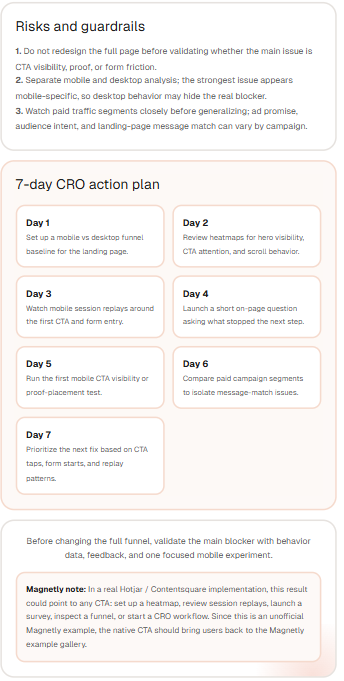
The final output turns funnel signals into a structured CRO pre-audit.
The best CRO lead magnets do not promise instant conversion lift. They help visitors decide what to inspect first.
How to build this type of lead magnet with Magnetly
You can build a conversion analyzer like this in Magnetly without custom development. The process is simple.
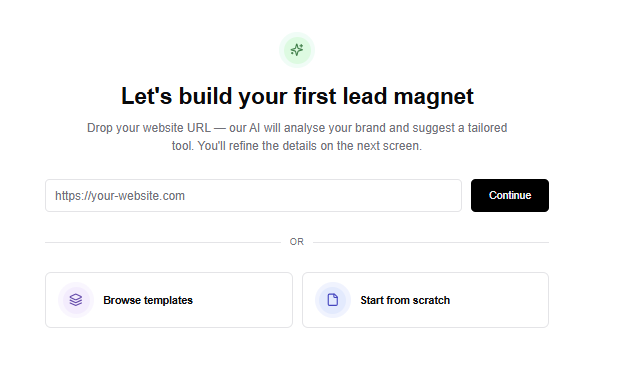
1. Start from a template or URL
You can start from a blank tool, an existing template or a website URL.
For a conversion analyzer, the strongest structure is a guided diagnostic flow. You need:
- a branded intro step
- a conversion goal step
- a friction signal step
- a behavior context step
- a loading step
- a final AI output step
Magnetly lets you customize each step visually.
2. Add the right input steps
For this example, the strongest inputs are:
- Page or funnel URL
- Page or funnel type
- Main conversion goal
- Audience description
- Suspected drop-off point
- Most worrying behavior signal
- Main traffic source
- Device context
Each answer becomes useful context for the AI output. This is what makes the result feel like a CRO pre-audit instead of a generic checklist.
3. Build the flow visually
Inside Magnetly, each step appears as a card in a horizontal builder canvas. You can edit titles, subtitles, input types, options, logic, visual style and buttons.
This is useful because a CRO analyzer should feel easy to complete. The visitor should not feel like they are filling a long analytics form. They should feel like they are explaining the problem to a CRO expert.
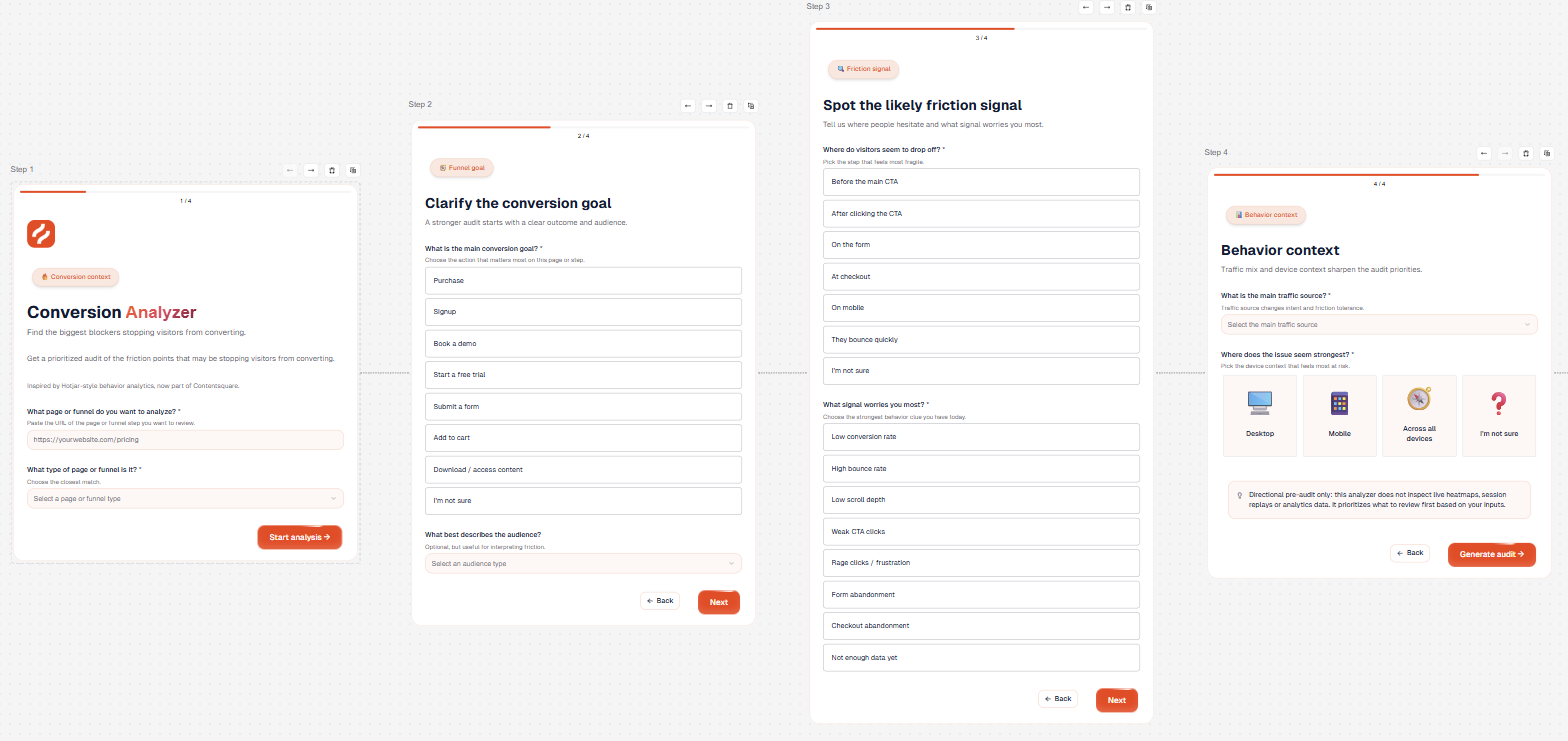
4. Brand the experience
This example uses a Hotjar-inspired visual language with warm orange accents, behavioral analytics vocabulary, friction language and audit-style result cards.
In Magnetly, you can customize colors, typography, layout, buttons and the result format. You can also use AI to adjust the content in plain language.
- Make the hypothesis more concise.
- Add mobile-specific risks.
- Make the experiments more practical.
- Rewrite the result for ecommerce.
- Make the audit more B2B SaaS focused.
5. Set up the final AI result
The final result is the most important part.
It should not just say "improve your CTA." It should explain why the CTA may be underperforming, what to inspect first, what experiments to run and what signals to watch.
This is how the magnet creates real value.
Prompt strategy
The final AI output prompt is what turns a simple diagnostic into a useful CRO pre-audit.
For this Hotjar-inspired analyzer, the prompt does five important things.
1. It defines the expert role
The AI is not acting like a generic assistant. It is positioned as a senior CRO strategist, UX researcher and behavioral analytics consultant.
That role matters because the output needs to think in terms of funnels, drop-off points, CTA visibility, form friction, mobile behavior, heatmaps, session replays, surveys and experiments.
2. It interprets the funnel context
The prompt adapts the analysis depending on the page type. A landing page, pricing page, checkout, signup flow, product page and booking flow do not have the same friction points. This makes the audit more specific.
3. It reads behavior signals carefully
The prompt maps signals like low scroll depth, weak CTA clicks, rage clicks, form abandonment and checkout abandonment to different inspection workflows.
This prevents the result from staying vague. Instead of saying "users may be confused", the output explains what the team should inspect first.
4. It creates a directional friction score
The prompt creates a friction score from the visitor's answers. That score is not a real analytics metric. It is a directional pre-audit score that helps prioritize risk.
The prompt also handles uncertainty carefully. If there is not enough data, it lowers confidence but does not automatically assume there is no friction.
5. It forces an actionable output
The output is structured into a friction score, funnel risk map, blocker hypothesis, inspection plan, quick experiments, guardrails and 7-day CRO action plan.
That structure makes the result usable. It gives the visitor a next step, not just an opinion.
Prompt breakdown
Here is the simplified structure behind the final AI prompt.
Role:
You are a senior CRO strategist, UX researcher and
behavioral analytics consultant.

Context:
This is a Hotjar-inspired conversion analyzer created with
Magnetly. It is not an official Hotjar or Contentsquare tool.

Inputs:
Use the visitor's page URL, funnel type, conversion goal,
audience, drop-off point, behavior signal, traffic source
and device context.

Analysis logic:
Interpret the funnel type, goal, audience, drop-off point,
behavior signal and device context.

Friction logic:
Create a directional friction score and confidence level.

Inspection logic:
Recommend the exact Hotjar-style workflows to inspect first.

Experiment logic:
Return 3 quick experiments with hypothesis, change to test
and signal to watch.

Output:
Return a premium CRO pre-audit with:

1. Hero summary card
2. Conversion friction score
3. Funnel risk map
4. Primary blocker hypothesis
5. What to inspect first
6. Quick experiments
7. Risks and guardrails
8. 7-day CRO action plan
9. Magnetly note
This is the part most teams underestimate.
The questions collect the behavioral context. The prompt turns that context into a prioritized inspection plan. That is why the output feels more useful than a generic CRO checklist.
Where to place this magnet on your website
A conversion analyzer works best where visitors already care about improving a page, funnel or campaign.
Your tool
Embed
Share
A CRO service page
The analyzer can turn broad conversion intent into a more qualified CRO conversation.
A landing page audit page
Visitors who are already worried about a landing page can use the analyzer to find what to inspect first.
A blog article about conversion optimization
If someone is reading about CTA performance, UX friction, heatmaps or forms, the analyzer can turn passive reading into an interactive pre-audit.
A paid ads or landing page article
Paid traffic teams often need to diagnose message match, CTA friction and mobile layout issues.
A product or pricing page resource
The analyzer can help visitors understand why people may hesitate before a purchase, signup or demo request.
A LinkedIn post or newsletter
Because the tool can be shared as a public link, it can also work outside the website.