
On this page
Most teams do not have a workflow problem because they lack tools.
They have a workflow problem because the work is scattered.
Tasks live in one place.
Docs live somewhere else.
Decisions are buried in meetings.
Follow-ups happen in Slack or email.
Reporting is rebuilt manually every week.
Ownership is unclear.
No one has a complete picture of progress.
That is why a Workflow Generator works well as an interactive lead magnet.
Instead of giving every visitor the same productivity checklist, it asks a few focused questions about their team, process, tools, bottleneck and goal.
Then it turns that context into a structured workspace plan.
The visitor gets a clearer operating system. The business captures rich workflow intent.
That is exactly what a strong AI lead magnet should do.
Why this workflow generator works as a lead magnet
A lot of productivity content is useful, but generic.
A blog post can explain documentation. A template gallery can show project views. A checklist can explain process hygiene.
But none of those formats understand how the visitor's team actually works.
A workflow generator does.
It asks the visitor to describe their team, the process they want to improve, the number of people involved, the tools they use today, the biggest current bottleneck, the main goal and the structure level they want.
That combination is powerful.
A visitor might say they want a better workflow, but inside their answers they may reveal a much more precise problem.
- Maybe work is scattered across too many tools.
- Maybe tasks are not clearly owned.
- Maybe deadlines are hard to track.
- Maybe docs and decisions are hard to find.
- Maybe meetings create too little follow-up.
- Maybe reporting takes too much manual work.
- Maybe no one has a clear view of progress.
This is why the magnet works. It turns a vague productivity problem into a first version of a workspace architecture.
Static templates show what exists. Interactive generators design what your team needs.
Why a Notion style example makes sense
Notion is strongly associated with docs, projects, wikis, databases, dashboards, meeting notes, knowledge bases and team operating systems.
That makes it a natural reference point for a workflow generator.
A Notion-style generator does not need to access a real workspace to create value. It can start with the visitor's process context.
- What team is this for?
- What process needs improvement?
- How many people are involved?
- Which tools are already in use?
- What is the biggest bottleneck?
- What goal matters most?
- How structured should the workflow be?
That is enough to create a useful first workspace plan.
The output should not pretend to be a complete Notion build. Instead, it should help the visitor understand what structure they need first.
That is the key.
A team does not always need another template. Often, they need a clear architecture: which database should exist, which views matter, which owners are required, which dashboards create visibility, which automations can remove manual work, and what to set up first.
This example shows how Magnetly can package that kind of operations thinking into an interactive lead magnet.
Why this is more than an AI-coded tool
This Notion example shows the real power of Magnetly. The tool is not just built with AI. It uses AI live to deliver a personalized workspace plan to every visitor.
AI app builders are powerful because they help you create software faster. You describe the interface, logic and workflow, then the AI helps generate the app.
That is useful, but it is not the same thing as what Magnetly does.
A classic AI-built tool usually has fixed logic. The visitor fills a form, the tool runs predefined rules, then it returns a result.
Magnetly goes further.
Category A
AI app builders
Great for creating software faster.
 Lovable
 Claude
You describe what to build. AI helps generate the app, interface and rules.
Category B
Magnetly
Built for live AI-powered lead magnets.
 Magnetly
Visitors interact with a branded tool. Their answers are sent to AI with your workflow expertise, so every plan feels tailored.
AI app builders help you build software. Magnetly helps you turn expertise into an AI experience your visitors can use.
With Magnetly, the visitor's answers become live context for an AI system. The tool captures the inputs, combines them with your business knowledge, your final output prompt, optional documents, website context and sometimes external research, then generates a personalized response.
That makes the experience feel less like a static template selector and more like a focused mini AI systems architect.
This Notion-style generator is a perfect example.
The visitor explains their team, process, tools and bottleneck. The AI turns that context into a workflow architecture, workspace setup, database preview, dashboards, automation opportunities and 7-day setup plan.
For a Notion consultant, operations agency, productivity expert, SaaS onboarding team or internal systems team, this is extremely valuable. Instead of building a rigid template chooser with dozens of branches, the business can package its workflow design methodology inside the prompt. The lead magnet becomes a lightweight systems strategist that works for every visitor, while still capturing rich lead context.
A coded tool follows logic. A Magnetly tool applies expertise.
The question strategy behind the generator
A strong workflow generator does not need to ask every possible operations question.
It needs to ask the few questions that shape the architecture. This Notion-style generator is built around seven layers.
1. Understand the team
The first layer asks what team the workflow is for.
A product team, marketing team, sales team, customer success team, operations team, HR team and leadership team do not need the same workspace.
A sales team may need pipeline stages, opportunity notes and follow-up visibility.
A marketing team may need content calendars, campaign approvals and publishing views.
A product team may need roadmap databases, feature requests and release views.
An operations team may need SOPs, recurring process dashboards and ownership rules.
This question prevents the output from becoming generic.
2. Understand the process to improve
The second layer asks which process needs work.
Project management, content production, product roadmap, customer onboarding, sales pipeline, hiring, meeting notes, knowledge base and bug tracking all require different database structures.
This is what makes the generator useful. It does not just say "create a dashboard." It chooses the workspace architecture based on the process.
3. Understand the number of people involved
Team size shapes the level of structure.
A workflow for a three-person team should not feel like enterprise governance. A workflow for a 50-person department needs clearer fields, owners, views and reporting rituals.
This helps the result stay practical. The workflow can be lightweight, balanced or highly structured depending on the team's context.
4. Understand the current tools
The generator also asks what tools the team uses today.
If the team uses Slack, Google Docs, Sheets, Trello, Jira, Asana, email or spreadsheets, the recommendation can explain how the new workspace should reduce scattered work rather than create another disconnected place.
This is important because workflow problems are often integration problems. The output can suggest what should become the source of truth and what should remain a supporting tool.
5. Understand the bottleneck
The bottleneck is the emotional core of the generator. The visitor may say:
- work is scattered across too many tools
- tasks are not clearly owned
- deadlines are hard to track
- docs and decisions are hard to find
- meetings create too little follow-up
- reporting takes too much manual work
- priorities change too often
- no one has a clear view of progress
Each bottleneck points to a different workspace design. This is what turns the tool from a form into a real diagnosis.
6. Understand the main workflow goal
The main goal tells the AI what to optimize for.
- Centralizing information → knowledge hub and connected databases.
- Clarifying ownership → owner fields and responsibility rules.
- Tracking projects better → project views and reporting.
- Reducing manual reporting → dashboards and summaries.
- Automating repetitive work → AI and automation opportunities.
This makes the output feel directed.
7. Understand the structure level
Finally, the generator asks how structured the workflow should be.
Lightweight means simple fields, fewer stages and minimal governance.
Balanced means enough fields, views and rituals to scale.
Highly structured means stronger dashboards, ownership, reporting and process rules.
This lets the result match the team's tolerance for structure.
What the visitor receives
The value of the generator is not the questions. The value is the first version of the workspace plan.
A weak generator gives a generic productivity checklist. A strong generator gives a structured operating system.
This Notion Workflow Generator is designed to output:
- Hero summary card
- Workflow architecture
- Recommended workspace setup
- Notion-style database preview
- Views and dashboards
- Automation and AI opportunities
- Risks and guardrails
- 7-day setup plan
- Final Magnetly note
The hero summary gives the visitor a clear workflow direction.
The workflow architecture turns the team, process, bottleneck and goal into a structured diagnosis.
The workspace setup explains what databases, pages or hubs should exist.
The database preview shows the first table structure the team could build.
The views and dashboards show how the team can see the work from different angles.
The automation and AI section identifies where summaries, routing or reporting can save time.
The risks and guardrails keep the workflow usable. The 7-day setup plan turns the idea into an implementation path.
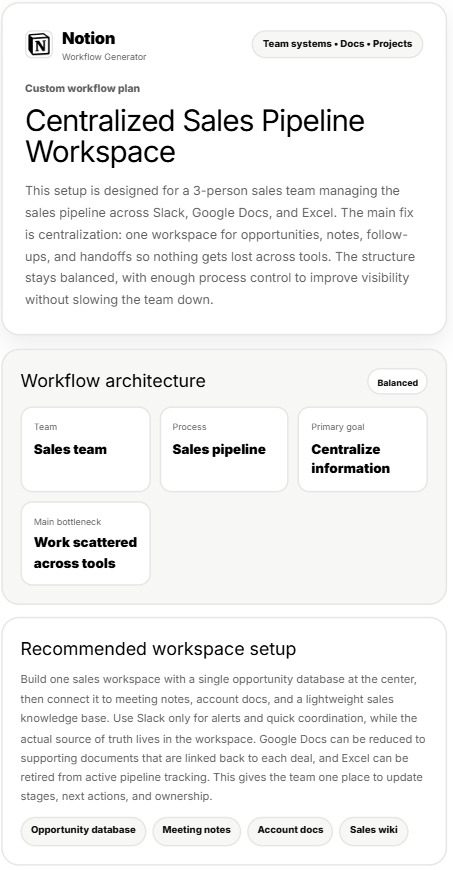
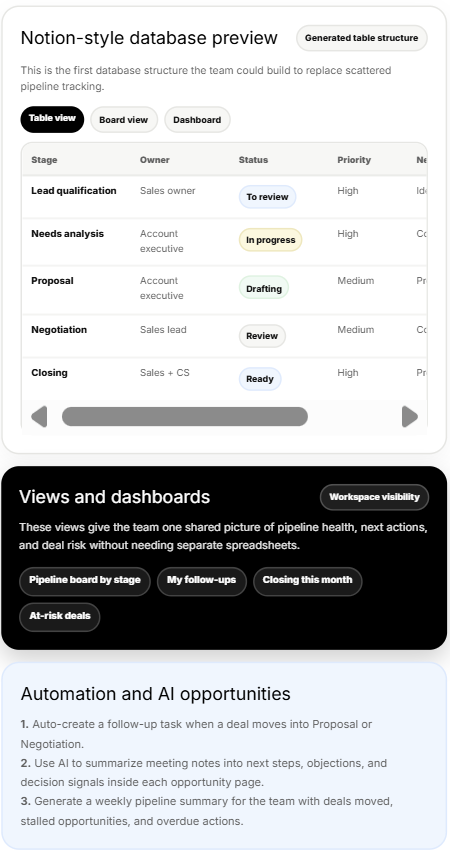
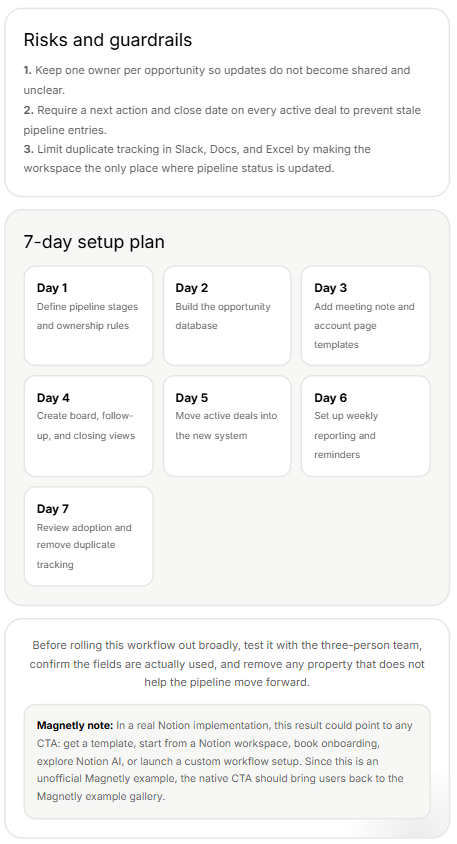
The final output turns workflow context into a structured workspace plan.
The best workflow lead magnets do not sell templates. They help visitors see the operating system their team actually needs.
How to build this type of lead magnet with Magnetly
You can build a workflow generator like this in Magnetly without custom development. The process is simple.
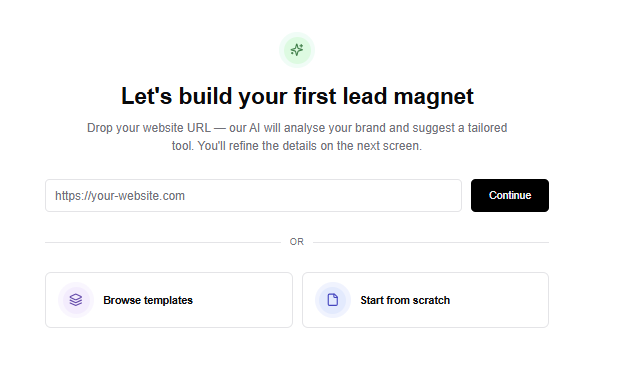
1. Start from a template or URL
You can start from a blank tool, an existing template or a website URL.
For a workflow generator, the strongest structure is a guided diagnostic flow. You need:
- a branded intro step
- a process context step
- a workflow bottleneck step
- a workflow goal step
- a loading step
- a final AI output step
Magnetly lets you customize each step visually.
2. Add the right input steps
For this example, the strongest inputs are:
- Team type
- Process to improve
- People involved
- Biggest current problem
- Current tools
- Main workflow goal
- Workflow structure level
Each answer becomes useful context for the AI output. This is what makes the result feel like a workflow architecture plan instead of a generic template list.
3. Build the flow visually
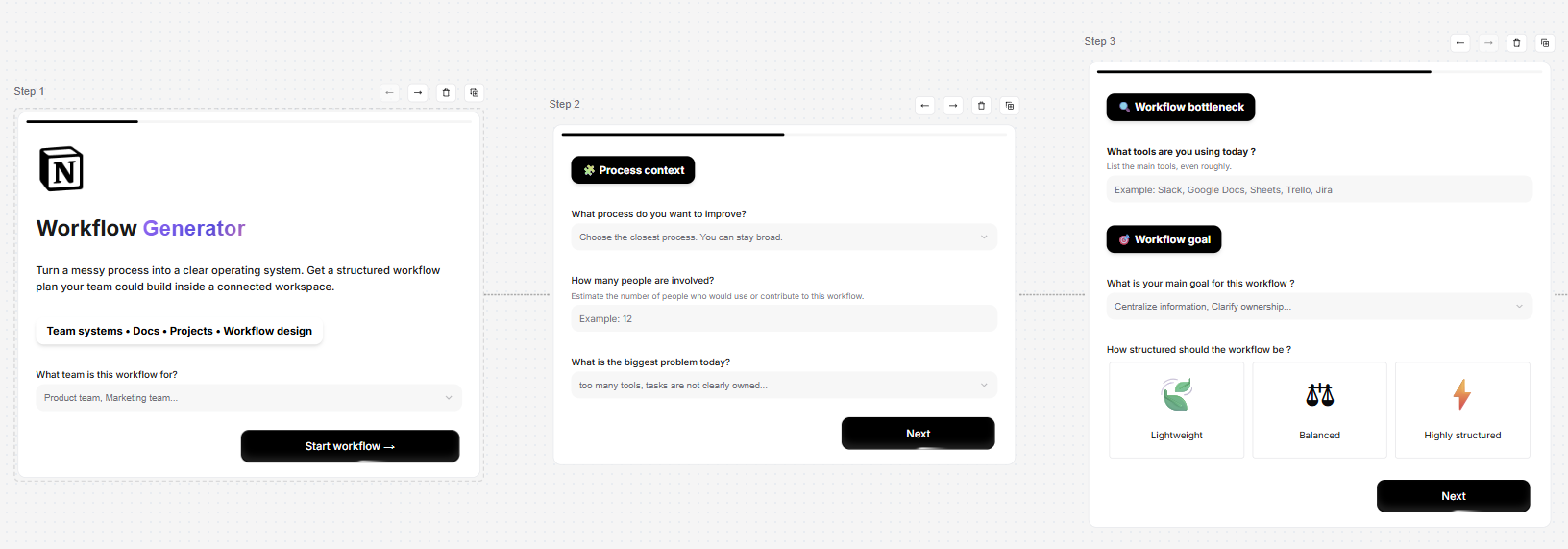
Inside Magnetly, each step appears as a card in a horizontal builder canvas. You can edit titles, subtitles, input types, options, logic, visual style and buttons.
This is useful because a workflow generator should feel easy to complete. The visitor should not feel like they are writing a full operations brief. They should feel like they are explaining the problem to a systems expert.
4. Brand the experience
This example uses a Notion-inspired visual language with black and white styling, minimal cards, database language, workspace architecture and clean output sections.
In Magnetly, you can customize colors, typography, layout, buttons and the result format. You can also use AI to adjust the content in plain language.
- Make the workflow more lightweight.
- Add a database view for leadership.
- Rewrite this for a marketing team.
- Make the setup plan more tactical.
- Add an automation opportunity.
5. Set up the final AI result
The final result is the most important part.
It should not just recommend "use Notion." It should explain what structure to build, which databases matter, which views create visibility, which automations reduce manual work and what to set up first.
This is how the magnet creates real value.
Prompt strategy
The final AI output prompt is what turns a simple diagnostic into a useful workspace architecture.
For this Notion-inspired generator, the prompt does five important things.
1. It defines the expert role
The AI is not acting like a generic assistant. It is positioned as a senior operations strategist, workflow architect and systems designer.
That role matters because the output needs to think in terms of docs, projects, ownership, knowledge bases, meeting notes, dashboards, AI-ready workflows and automation opportunities.
2. It interprets the team and process
The prompt adapts the recommendation depending on the team and process.
A sales pipeline, content production workflow, hiring process, customer onboarding system and internal knowledge base do not need the same structure. This makes the output more specific.
3. It maps bottlenecks to architecture
The prompt uses the biggest current problem to sharpen the recommendation.
- If work is scattered, it emphasizes centralization.
- If ownership is unclear, it emphasizes owner fields and responsibility rules.
- If deadlines are hard to track, it emphasizes timelines and reminders.
- If docs are hard to find, it emphasizes a knowledge base and decision logs.
- If reporting is manual, it emphasizes dashboards and summaries.
This prevents the result from becoming a generic productivity answer.
4. It generates a database preview
A key part of the result is the Notion-style database preview.
The prompt selects the right columns and example rows based on the process.
- For a sales pipeline, it can show stage, owner, status, priority and next action.
- For content production, it can show content item, owner, status, channel and next action.
- For customer onboarding, it can show customer, owner, stage, risk and next step.
This makes the output feel tangible.
5. It forces an operational output
The output is structured into workspace architecture, database preview, views, dashboards, automation opportunities, risks and a 7-day setup plan.
That structure makes the result usable. It gives the visitor a first operating system, not just an opinion.
Prompt breakdown
Here is the simplified structure behind the final AI prompt.
Role:
You are a senior operations strategist, workflow architect
and systems designer.

Context:
This is a Notion-inspired workflow generator created with
Magnetly. It is not an official Notion tool.

Inputs:
Use the visitor's team type, process to improve, people
involved, current tools, bottleneck, workflow goal and
structure level.

Workflow logic:
Adapt the workspace architecture based on the team,
process, bottleneck, goal and desired structure level.

Database logic:
Generate a first Notion-style database preview with the
most relevant columns and rows for the selected process.

Output:
Return a premium workflow plan with:

1. Hero summary card
2. Workflow architecture
3. Recommended workspace setup
4. Notion-style database preview
5. Views and dashboards
6. Automation and AI opportunities
7. Risks and guardrails
8. 7-day setup plan
9. Magnetly note
This is the part most teams underestimate.
The questions collect the workflow context. The prompt turns that context into a first version of a connected workspace. That is why the output feels more useful than a generic template recommendation.
Where to place this magnet on your website
A workflow generator works best where visitors already know their process is messy, but do not know what structure to build first.
Your Magnetly tool
Embed
Share
A Notion consultant service page
The generator can turn broad workflow intent into a more qualified systems conversation.
A productivity or operations agency landing page
Visitors who are already looking for help with processes, systems or documentation can use the generator to see what kind of workspace they need.
A blog article about team workflows
If someone is reading about project management, docs, dashboards or productivity systems, the generator can turn passive reading into an interactive workflow plan.
A template gallery
Instead of showing visitors dozens of templates, the generator can recommend the type of workspace structure that fits their team.
A LinkedIn post or newsletter
Because the tool can be shared as a public link, it can also work outside the website.
A resource hub or tools page
The generator can become a permanent free tool that attracts high-intent visitors over time.