
On this page
Most B2B teams want a stronger pipeline, but "more pipeline" is rarely one single problem.
Sometimes the issue is lead volume.
Sometimes the issue is win rate.
Sometimes average deal size is too low.
Sometimes sales cycles are too long.
Sometimes the team has enough opportunities, but forecast discipline and stage hygiene are weak.
That is why a Pipeline Simulator works well as an interactive lead magnet.
Instead of giving every visitor the same sales forecasting guide, it asks a few focused questions about their sales motion, qualified lead volume, win rate, average deal size, sales cycle and growth goal.
Then it turns those inputs into a directional pipeline projection.
The visitor gets a clearer view of which revenue lever could matter most. The business captures high-value revenue operations context.
That is exactly what a strong AI lead magnet should do.
Why this pipeline simulator works as a lead magnet
A lot of sales content is useful, but generic.
A blog post can explain forecasting. A guide can explain pipeline hygiene. A checklist can explain win rate improvement.
But none of those formats understand how the visitor's pipeline currently works.
A pipeline simulator does.
It asks for the inputs that actually shape sales outcomes: qualified lead volume, win rate, average deal size, sales cycle length and the first improvement the team is considering.
That combination is powerful.
A visitor might say they want more revenue, but inside their answers they may reveal a more precise growth lever.
- Maybe the team has enough leads but a weak win rate.
- Maybe deal size is the biggest growth constraint.
- Maybe the sales cycle is long enough to create forecast uncertainty.
- Maybe lead volume is low but the close rate is healthy.
- Maybe the strongest move is not more pipeline, but better opportunity qualification and sales coaching.
This is why the magnet works. It turns a vague revenue goal into a pipeline projection and an experiment plan.
Static sales content explains pipeline theory. Interactive simulators reveal which lever to test first.
Why a Salesforce style example makes sense
Salesforce is strongly associated with CRM, opportunity management, pipeline visibility, revenue intelligence, forecasting, sales coaching, pipeline inspection and deal execution.
That makes it a natural reference point for a pipeline simulator.
A Salesforce-style simulator does not need to connect to a real CRM to create value. It can start with a visitor's own sales assumptions.
- How many qualified leads do they generate?
- What is their current win rate?
- What is their average deal size?
- How long is their sales cycle?
- Which improvement are they considering first?
- What is their growth goal?
- How ambitious should the projection be?
That is enough to create a useful directional projection.
The output should not pretend to be a complete sales forecast. Instead, it should help the visitor understand which lever is worth testing first.
That is the key.
A sales team does not always need a huge forecast model to take action. Often, they need a clearer view of whether pipeline growth should come from more leads, better win rate, higher deal size, shorter cycles or a controlled improvement across multiple drivers.
This example shows how Magnetly can package that revenue operations thinking into an interactive lead magnet.
Why this is more than an AI-coded tool
This Salesforce example shows the real power of Magnetly. The tool is not just built with AI. It uses AI live to deliver a personalized revenue projection to every visitor.
AI app builders are powerful because they help you create software faster. You describe the interface, logic and workflow, then the AI helps generate the app.
That is useful, but it is not the same thing as what Magnetly does.
A classic AI-built tool usually has fixed logic. The visitor fills a form, the tool runs predefined rules, then it returns a result.
Magnetly goes further.
Category A
AI app builders
Great for creating software faster.
 Lovable
 Claude
You describe what to build. AI helps generate the app, interface and rules.
Category B
Magnetly
Built for live AI-powered lead magnets.
 Magnetly
Visitors interact with a branded tool. Their answers are sent to AI with your revenue expertise, so every projection feels tailored.
AI app builders help you build software. Magnetly helps you turn expertise into an AI experience your visitors can use.
With Magnetly, the visitor's answers become live context for an AI system. The tool captures the inputs, combines them with your business knowledge, your final output prompt, optional documents, website context and sometimes external research, then generates a personalized response.
That makes the experience feel less like a static sales calculator and more like a focused mini revenue strategist.
This Salesforce-style simulator is a perfect example.
The visitor enters sales assumptions and the AI turns them into a pipeline projection, scenario view, recommended pipeline move, Salesforce-style stack, risks and next experiment plan.
For a RevOps consultant, Salesforce partner, sales enablement team, B2B SaaS company or revenue agency, this is extremely valuable. Instead of building a rigid spreadsheet-style calculator with dozens of branches, the business can package its pipeline logic and sales methodology inside the prompt. The lead magnet becomes a lightweight revenue strategist that works for every visitor, while still capturing rich lead context.
A coded tool follows logic. A Magnetly tool applies expertise.
The question strategy behind the simulator
A strong pipeline simulator does not need to ask every possible RevOps question.
It needs to ask the few questions that shape the projection. This Salesforce-style simulator is built around eight layers.
1. Understand the sales motion
The first layer asks what best describes the sales motion.
Inbound, outbound, product-led, partner-led, enterprise sales and hybrid motions behave differently.
An inbound team may need stronger qualification and routing. An outbound team may need better targeting, messaging and meeting conversion. A product-led team may need activation signals and expansion paths. An enterprise team may need forecast discipline, opportunity inspection and deal risk management.
This question prevents the simulator from becoming generic.
2. Capture qualified lead volume
The second layer asks how many qualified leads the team generates per month.
This gives the simulator a pipeline base. Lead volume does not automatically create revenue, but it defines the size of the opportunity pool.
The final result can then explain whether the team should focus on generating more leads or improving the conversion of the leads they already have.
3. Capture the current win rate
Win rate is one of the most important sales levers.
A low win rate usually points to qualification, discovery, sales enablement, deal coaching or pipeline inspection problems. A healthy win rate with low lead volume often points to acquisition or routing constraints.
This is why the win rate input is so valuable. It helps the simulator choose whether the strongest lever is volume, conversion or deal quality.
4. Understand average deal size
Average deal size shapes the revenue impact of every closed opportunity.
A small change in deal size can create meaningful revenue lift if lead volume and win rate are stable. If deal size is low relative to the motion, the recommendation can focus on packaging, segmentation, value-based selling, enterprise motion or expansion playbooks.
This helps the simulator avoid assuming that more leads are always the answer.
5. Understand sales cycle length
Sales cycle length does not always increase revenue directly, but it affects cash flow, forecast discipline and the speed of learning.
- A short cycle creates faster feedback loops.
- A 30 to 60 day cycle is usually manageable.
- A 60 to 120 day cycle needs stronger stage hygiene and opportunity inspection.
- A cycle above 120 days often requires procurement visibility, decision-maker mapping and deal risk management.
This helps the output keep the forecast realistic.
6. Identify the first improvement considered
The simulator asks which improvement the visitor is considering first.
- increase lead volume
- improve win rate
- increase average deal size
- shorten sales cycle
- improve all drivers moderately
- get a recommendation
This input shapes the projection. It also reveals the visitor's current growth hypothesis.
7. Understand the main growth goal
The main growth goal tells the AI what the visitor is actually trying to achieve.
- Some teams want more pipeline.
- Some want more closed revenue.
- Some want more opportunities.
- Some want better forecast accuracy.
- Some want a more predictable sales motion.
This gives the final output a clearer strategic direction.
8. Choose the projection style
Finally, the simulator asks how ambitious the projection should be.
Conservative, balanced and aggressive projections should not be treated the same way.
- A conservative projection should emphasize controlled execution.
- A balanced projection should show the most realistic base case.
- An aggressive projection should include stronger risk warnings and a reminder to validate assumptions before scaling.
This makes the output feel credible instead of inflated.
What the visitor receives
The value of the simulator is not the questions. The value is the directional pipeline projection.
A weak simulator gives one revenue number. A strong simulator gives a scenario view, a recommended sales lever and a controlled experiment plan.
This Salesforce Pipeline Simulator is designed to output:
- Hero summary card
- Pipeline projection
- Scenario view
- Recommended pipeline move
- Suggested Salesforce stack
- Risks and guardrails
- Next experiment plan
- Final Magnetly note
The hero summary gives the visitor a clear revenue direction.
The pipeline projection estimates current pipeline value, baseline closed revenue, projected monthly uplift and annualized impact.
The scenario view compares conservative, balanced and aggressive outcomes.
The recommended pipeline move explains which lever to test first.
The Salesforce stack connects the recommendation to CRM execution.
The risks and guardrails keep the projection realistic.
The next experiment plan turns the recommendation into a controlled RevOps test.
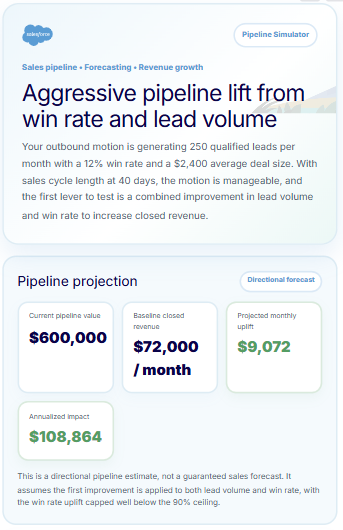
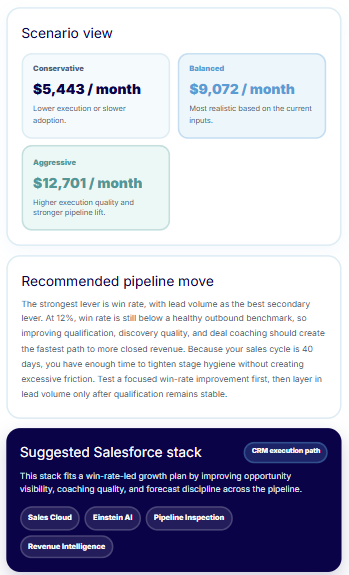
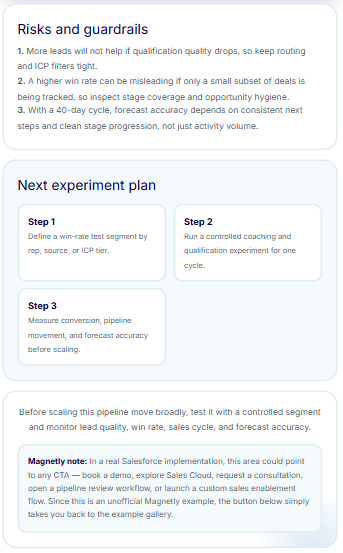
The final output turns sales assumptions into a structured pipeline projection.
The best revenue lead magnets do not promise growth. They help teams choose the lever worth testing first.
How to build this type of lead magnet with Magnetly
You can build a pipeline simulator like this in Magnetly without custom development. The process is simple.
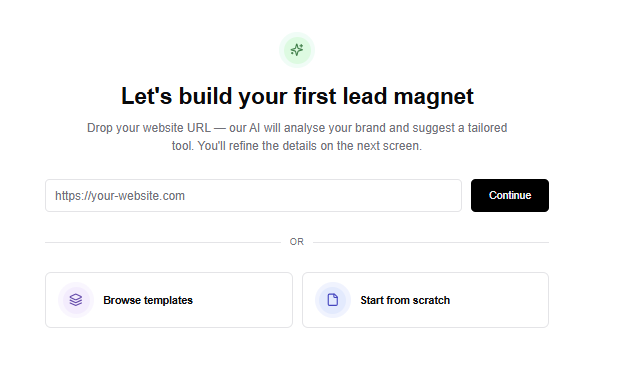
1. Start from a template or URL
You can start from a blank tool, an existing template or a website URL.
For a pipeline simulator, the strongest structure is a guided revenue diagnostic flow. You need:
- a branded intro step
- a pipeline input step
- a growth hypothesis step
- a projection style step
- a loading step
- a final AI output step
Magnetly lets you customize each step visually.
2. Add the right input steps
For this example, the strongest inputs are:
- Sales motion
- Qualified leads per month
- Current win rate
- Average deal size
- Average sales cycle length
- Improvement considered first
- Main growth goal
- Realistic improvement percentage
- Projection style
Each answer becomes useful context for the AI output. This is what makes the result feel like a revenue projection instead of a generic sales checklist.
3. Build the flow visually
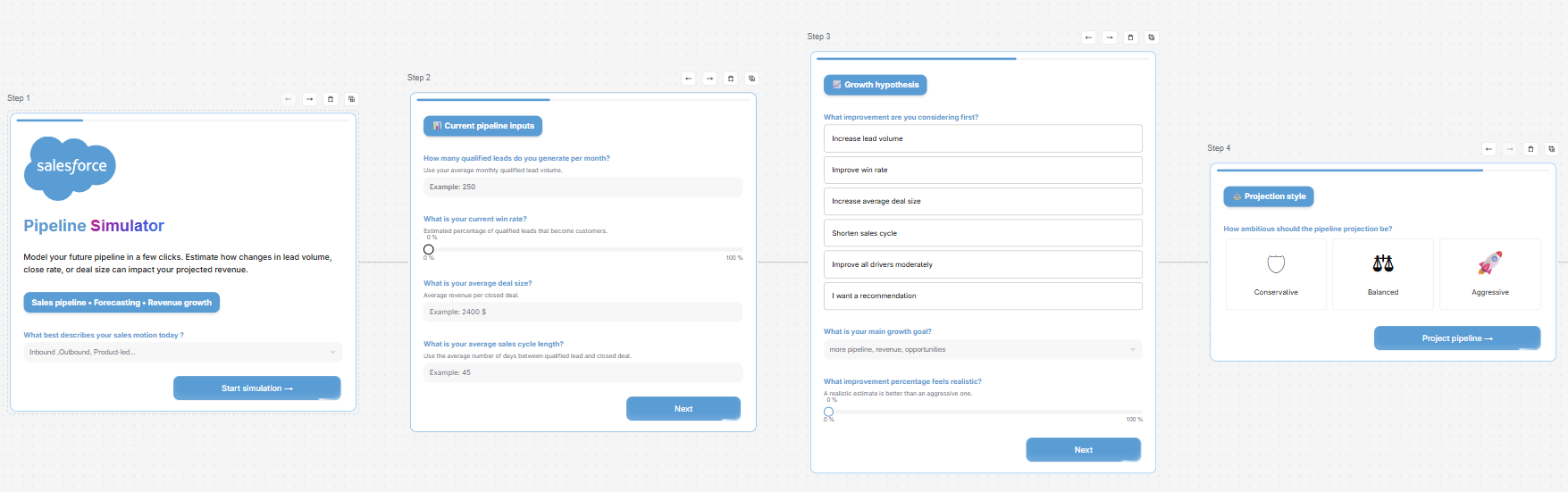
Inside Magnetly, each step appears as a card in a horizontal builder canvas. You can edit titles, subtitles, input types, options, logic, visual style and buttons.
This is useful because a pipeline simulator should feel easy to complete. The visitor should not feel like they are filling a complex financial model. They should feel like they are describing their sales motion to a revenue operations expert.
4. Brand the experience
This example uses a Salesforce-inspired visual language with soft blue backgrounds, clean enterprise cards, CRM vocabulary, forecasting language and pipeline-focused metrics.
In Magnetly, you can customize colors, typography, layout, buttons and the result format. You can also use AI to adjust the content in plain language.
- Make the projection more conservative.
- Add more detail on win rate improvement.
- Rewrite this for an outbound sales team.
- Make the experiment plan more tactical.
- Add forecast accuracy guardrails.
5. Set up the final AI result
The final result is the most important part.
It should not just calculate "more revenue." It should explain why the lever matters, what Salesforce-style stack supports the execution, what risks to watch and how to test the change before scaling.
This is how the magnet creates real value.
Prompt strategy
The final AI output prompt is what turns simple sales inputs into a useful revenue projection.
For this Salesforce-inspired simulator, the prompt does five important things.
1. It defines the expert role
The AI is not acting like a generic assistant. It is positioned as a senior revenue operations strategist, sales forecasting analyst and pipeline growth consultant.
That role matters because the output needs to think in terms of qualified leads, win rate, deal size, sales cycle, pipeline visibility, forecast accuracy, opportunity inspection and controlled experiments.
2. It applies directional calculation logic
The prompt calculates baseline monthly closed revenue from qualified leads, win rate and average deal size. It also estimates current pipeline value and annualized revenue impact.
This gives the visitor a numerical view of the pipeline. But it stays careful. The result is not positioned as a guaranteed forecast. It is a directional projection based on the visitor's own inputs.
3. It maps improvement levers to revenue logic
The prompt interprets different improvement choices differently.
- Increasing lead volume changes the number of qualified leads.
- Improving win rate changes close rate.
- Increasing average deal size changes revenue per deal.
- Shortening the sales cycle is treated as a velocity improvement, not a full revenue multiplier.
- Improving all drivers moderately spreads the improvement across multiple factors.
This keeps the simulation more credible.
4. It recommends the right pipeline move
The prompt does not simply return the biggest number. It explains what should be tested first.
- If win rate is low, it prioritizes qualification, sales enablement, deal coaching and pipeline inspection.
- If lead volume is the constraint, it recommends improving lead quality and routing, not just generating more leads.
- If deal size is the lever, it points toward packaging, value-based selling and segmentation.
- If sales cycle is the issue, it highlights stage hygiene, next-step discipline and deal risk visibility.
This makes the output actionable.
5. It connects the strategy to a Salesforce-style stack
The prompt also recommends a relevant Salesforce-style stack. For example:
- Pipeline visibility can use Sales Cloud, Pipeline Inspection and Forecasting.
- Win rate improvement can use Sales Cloud, Einstein AI, Pipeline Inspection and Revenue Intelligence.
- Forecast accuracy can use Forecasting, Revenue Intelligence and CRM Analytics.
- Sales coaching can use Einstein AI, Pipeline Inspection and Sales Cloud.
This makes the result feel connected to execution, not just analysis.
Prompt breakdown
Here is the simplified structure behind the final AI prompt.
Role:
You are a senior revenue operations strategist, sales
forecasting analyst and pipeline growth consultant.

Context:
This is a Salesforce-inspired pipeline simulator created
with Magnetly. It is not an official Salesforce tool.

Inputs:
Use the visitor's sales motion, qualified leads per month,
win rate, average deal size, sales cycle length, improvement
considered first, growth goal, improvement percentage and
projection style.

Calculation logic:
Estimate baseline pipeline value, baseline closed revenue,
projected monthly uplift and annualized impact.

Scenario logic:
Create conservative, balanced and aggressive pipeline
scenarios.

Recommendation logic:
Choose the strongest pipeline lever and explain what should
be tested first.

Salesforce stack logic:
Recommend the most relevant Salesforce-style products for
pipeline visibility, forecasting, coaching and execution.

Output:
Return a premium pipeline simulator result with:

1. Hero summary card
2. Pipeline projection
3. Scenario view
4. Recommended pipeline move
5. Suggested Salesforce stack
6. Risks and guardrails
7. Next experiment plan
8. Magnetly note
This is the part most teams underestimate.
The questions collect the revenue context. The prompt turns that context into a directional pipeline projection and a controlled experiment plan. That is why the output feels more useful than a generic sales forecasting checklist.
Where to place this magnet on your website
A pipeline simulator works best where visitors already care about sales performance, revenue planning or forecast accuracy.
Your Magnetly tool
Embed
Share
A RevOps consulting service page
The simulator can turn broad revenue intent into a more qualified pipeline conversation.
A Salesforce partner landing page
Visitors who are already considering CRM or Salesforce execution can use the simulator to understand which pipeline lever matters first.
A blog article about sales forecasting
If someone is reading about pipeline management, sales forecasting or win rate improvement, the simulator can turn passive reading into an interactive projection.
A sales enablement resource page
The simulator can help sales leaders model whether the team should focus on lead volume, win rate, deal size or cycle time.
A LinkedIn post or newsletter
Because the tool can be shared as a public link, it can also work outside the website.
A resource hub or tools page
The simulator can become a permanent free tool that attracts high-intent RevOps and sales leaders over time.